Design Systems and Interface Consistency for Business Apps: From Tokens to Maintained Components
In this article
- Summary
- What a design system actually is
- Why even small businesses need it
- Signs your product already needs one
- How to start without halting other work
- The components used most in business applications
- Accessibility as part of the foundation
- One design language for web and mobile
- Collaboration between designers and developers
- A real example: the order form in a business app
- Maintaining the design system so it stays alive
- How much investment is reasonable
- Common mistakes
- Measuring the benefit realistically
- First steps you can start this week
- Closing
Many business applications grow like a house built in stages by different people. The first page is made by one person, the next feature by another, then there is an urgent addition near the end of the month. The result is buttons of differing colours and sizes, inconsistent terms, and forms whose behaviour changes from one screen to another.
For users, inconsistency feels like fatigue. They have to guess again what this button means, where that menu is, and why an error message on one page looks different from another. For the development team, inconsistency means repeated work: every new screen is built from scratch.
A design system is the answer. It is not just a collection of beautiful pictures, but a shared agreement on colours, type, spacing, components, and behaviours used across the whole product. This article explains what it contains, why it matters even for small businesses, how to start without delaying other work, and how to maintain it so it does not become a forgotten document.
Summary
- A design system is a shared agreement on how an interface looks and behaves
- Benefits: users understand faster, the team works faster, and quality is better preserved
- Start small from the most used elements, not building everything at once
- Treat it as a product that is maintained, with an owner and change rules
- Include accessibility from the start so components can be used by everyone
What a design system actually is
A design system has several layers. The most basic layer is the visual elements called design tokens: colour palette, font family, text size scale, spacing, rounded corners, and shadows. With tokens, a decision such as the primary colour is written once and used everywhere, so changing it only takes one place.
The next layer is components: buttons, input fields, cards, tables, dialog windows, notifications, and navigation menus. Each component has variants and states, for example normal, highlighted, disabled, and error. The top layer is patterns: how to arrange components to complete common tasks such as a registration form, a searchable list, or a confirmation flow.
Finally, there are writing and behaviour guidelines: tone of language, button naming, how to show error messages, and rules such as when to use a dialog. This part is often neglected, yet it is what makes a product feel like it was made by one team.
Why even small businesses need it
There is an assumption that a design system is only for large companies with dozens of designers. In reality, the benefit is felt strongly in small teams because every working hour is precious. A small team has no time to remake a button for the fifth time or argue about which blue is correct.
- Users learn once and can use the entire application smoothly
- Developers assemble new screens from existing components rather than from scratch
- Brand or appearance changes can be applied at once across the whole application
- Fewer visual defects that arise because each person interprets things differently
- Easier onboarding of new team members or external vendors
- Quality stays stable as the product grows larger
There is a cost impact too. Work that is repeated is work paid for twice. A design system turns part of the interface work from a one off project into an asset that keeps being reused.
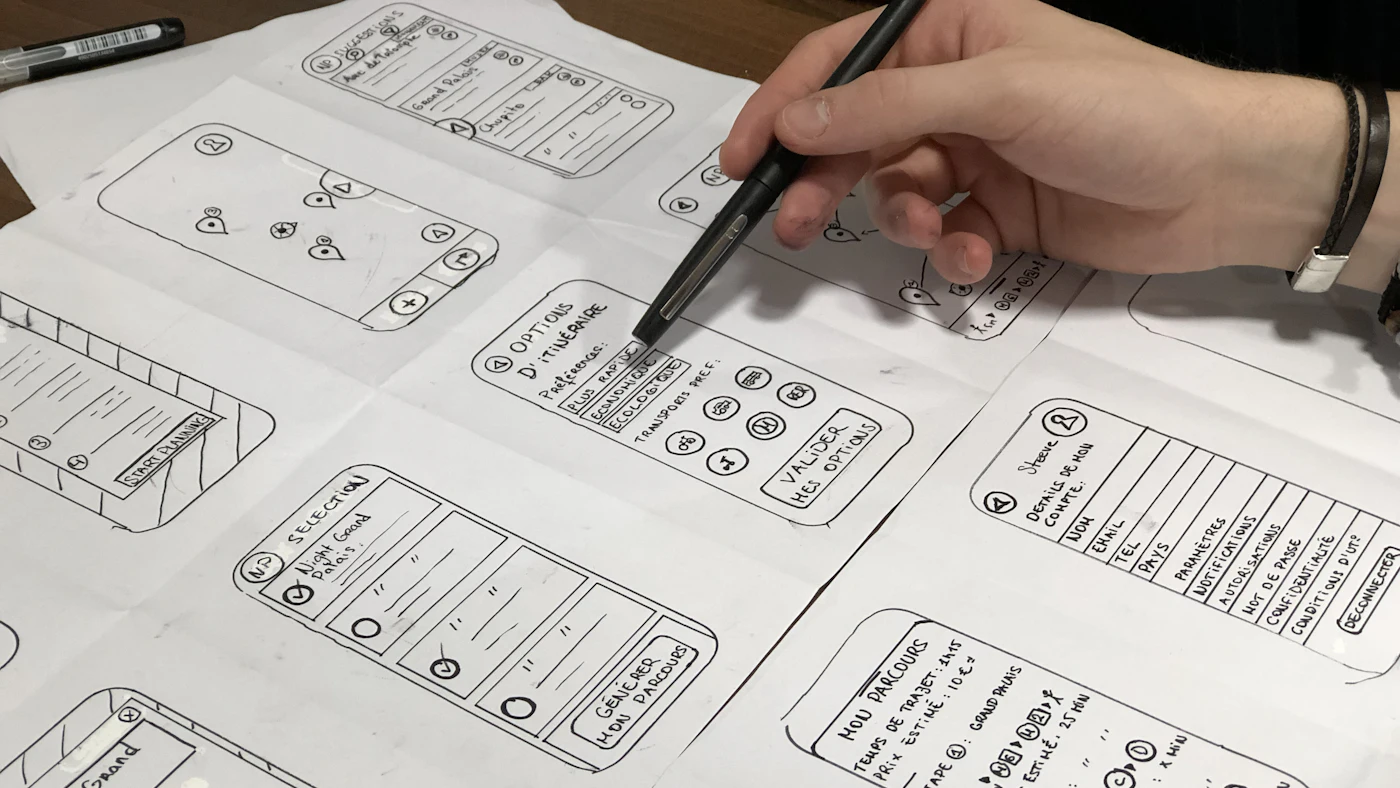
Signs your product already needs one
- There are many variations of buttons or headings that look similar but are not exactly the same
- Forms in different sections use different layouts and error messages
- Developers repeatedly ask designers small things
- A simple change, such as switching the primary colour, requires edits in dozens of places
- The web app and mobile app feel like two products from different companies
- Users often misclick or get confused by inconsistent behaviour
If two or three of the signs above appear, a simple design system will soon repay its investment. The longer it is delayed, the more screens will have to be tidied again.
How to start without halting other work
A common mistake is to start with a large project lasting months before a single screen uses it. A healthier approach is to grow alongside the product: gather what exists, agree on it, then use it in the next work.
- 01Inventory: capture screenshots of all main pages and group similar elements
- 02Define base tokens: primary colour, supporting colours, fonts, text sizes, and standard spacing
- 03Pick the ten most used components and tidy them first
- 04Document briefly: when to use, when not to, and usage examples
- 05Apply to new features, then update old screens gradually as they are touched
- 06Appoint an owner who decides changes and keeps consistency
For businesses without a full time designer, using a mature component library as a base and adjusting colours and fonts often makes more sense than building from scratch. What matters is consistency and fit with your needs, not the originality of each component.
The components used most in business applications
Business applications differ from marketing sites. They are full of data, forms, tables, and repeated actions. So the most valuable components are those that support such work efficiently.
Forms and input fields
Forms are the heart of a business application. Standardise labels, helper text, marking of required fields, and how errors are shown. Error messages should explain what is wrong and how to fix it, not merely state that the entry is invalid. Consistent behaviour lets users complete forms faster and with fewer mistakes.
Tables and data lists
Tables show a lot of information and demand design decisions: which columns can be sorted, how search and filtering work, how bulk actions are performed, and how it looks on small screens. Decide once, then use it across all lists so users do not relearn each time.
Feedback and system states
Users need to know what is happening: loading, saved successfully, failed, or empty. Design these states as part of the component, not as an afterthought. An empty state that explains the next step is far more helpful than a blank page with no explanation.
Consistency is not rigid uniformity
The aim of a design system is to make the same things look and behave the same, not to make everything look identical. Leave room for justified variation, for example a dense view for operators who work with data all day, and a spacious view for customers who visit only occasionally.
Accessibility as part of the foundation
One of the biggest benefits of a design system is accessibility built once and inherited by every screen. If the button component already has sufficient colour contrast, visible keyboard focus, and adequate touch size, every button in the app automatically gets it.
Conversely, if accessibility is left to each developer, the results are uneven. Check the base components against common needs: text contrast, keyboard navigation, labels for screen readers, and text that remains readable when enlarged. Fixing at the component level is far cheaper than fixing in hundreds of places.

One design language for web and mobile
If your business has both a web app and a mobile app, a design system helps them feel like one family. The same tokens, such as colours and fonts, can be shared across both platforms. Components need not be technically identical, but their behaviour should be predictable.
Respect platform habits too. Android and iOS users have different navigation expectations, and forcing one pattern on all often makes the app feel foreign. A good design system separates what must be the same, namely identity and logic, from what may adapt, namely the platform's native interaction patterns.
Collaboration between designers and developers
A good design system is born of two way cooperation. Designers think about experience and consistency, developers think about technical feasibility and ease of maintenance. If only one side writes it, the result tends to be beautiful but hard to build, or easy to build but awkward to use.
Make sure the components drawn in the design tool match those in code, with aligned names and variants. If the terms differ, every conversation must start with translation. Agree a shared vocabulary, for example what is called a card, panel, or sheet, so discussion becomes efficient.
Build a habit of short reviews before a new screen is worked on. In a few minutes, designers and developers can confirm which components will be used, what needs adding, and whether any states have been missed, such as empty data or errors. Early review is far cheaper than revision after everything is built.
A real example: the order form in a business app
Imagine an app with a purchase order form, a goods receipt form, and a leave request form. Without a design system, all three are made by different people at different times. One puts the save button top left, another bottom right, and the third uses an icon with no text. Error messages appear as a pop up window on one form and as red text on another.
With a design system, all three are assembled from the same components: input fields with uniform labels and help, a group of action buttons in the same position, and the same error pattern. A user who is used to one form immediately understands the other two. Developers only need to take care of what is genuinely specific to each form, namely the content and rules.
The impact is felt in training too. New employees learn one pattern and can use it across the whole app. Training material becomes shorter, and questions to support decrease. This is an example of how a design investment that looks technical gives direct benefit to business operations.
Maintaining the design system so it stays alive
Documentation that is not maintained quickly becomes a memory. A healthy design system has a clear owner, a path to propose new components, and a habit of reviewing whether any screens have drifted. Without it, teams will make their own solutions because they feel the system does not follow their needs.
- Decide who has the authority to approve new components or changes
- Create a lightweight proposal path so the team does not avoid it
- Record changes and their reasons so old decisions are not argued over again
- Periodically review components that are rarely used or have many variants
- Measure usage: how many new screens are built from system components
Treat big changes carefully. Changing a component used in hundreds of places can break the appearance unexpectedly. Apply changes gradually, test on representative screens, and inform the team before enforcing.
How much investment is reasonable
The amount of investment should be proportional to the size of the product. An app with ten screens does not need a component library as large as a product with a hundred screens. For a small product, a set of tokens, a dozen core components, and one page of guidelines is enough. For a growing product, investment can increase as the team and complexity grow.
Ask two things before deciding. First, how often the team builds new screens or features. Second, how many people are involved in building them. The more often and the more people, the greater the benefit of a design system. If the product rarely changes and is held by one person, a light approach is sufficient.
Also avoid the temptation to build a system that is too general purpose for future needs that are not yet clear. Components built for scenarios that never happen only add maintenance burden. Build what is needed now, and let the system grow when the need actually arises.
Common mistakes
- Building too many components before there is a real need
- Treating the design system as a finished project rather than a growing product
- Making it only for designers so developers do not use it
- No owner, so everyone adds their own variations
- Ignoring edge cases such as long text, empty data, and small screens
- Chasing an impressive look at the expense of readability and speed
Measuring the benefit realistically
The benefit of a design system is often hard to state as a single number, but there are indicators you can observe. Watch the time needed to build a new screen, the number of visual corrections during review, the number of small questions from developers to designers, and user complaints about interface confusion.
Compare before and after on a few similar features. If similar features are now finished faster and with fewer revisions, that is real evidence. Do not wait for perfect numbers; watch the trend, then adjust your investment.
First steps you can start this week
- 01Capture screenshots of the ten most used pages and mark the elements that differ
- 02Set one primary colour, one font family, and a spacing scale agreed together
- 03Choose buttons, input fields, and error messages as the first three components to standardise
- 04Write a one page short guide on when to use them
- 05Appoint one person as the keeper of consistency and review the result every month
Closing
A design system is not about making an app prettier, but making it easier to use, faster to develop, and more resilient to growth. Consistency is a form of respect for users: they do not need to relearn just because our team changed.
Start from the small and most used, maintain it with discipline, and let it grow with the product. Within a few months, you will feel that building a new screen becomes assembly work, not building from scratch.
Does your app's interface feel inconsistent and hard to develop?
The AG·SORA team helps tidy up interfaces and build consistent component systems for both web and mobile apps. The initial consultation is free and without obligation.
Free consultationRecommended for you
Reading related to this topic
Progressive Web Apps (PWA): An App Experience Without the App Store
A PWA can be installed on the home screen, works on a weak signal, and is built once for every device. When a PWA is the right choice for a business, and when a native app is still better.
Mobile Apps for Low End Phones and Slow Networks: Staying Comfortable for Real Customers
Designing a light, resilient app: understanding customers' devices, app size, launch speed, saving data, working offline, battery and memory, a simple interface, testing in real conditions, and a performance budget.
Headless Website Architecture for Business: When It Makes Sense and When It Doesn't
Headless commerce and composable architecture are often pitched as progress. A plain explanation, the benefits and the price, when it is worth considering, a gradual middle path, and how to decide without following trends.
Free checklist: choosing a software house
24 points to evaluate a vendor before you sign. Can be saved as a PDF.
Ready to build a system that grows with your business?
Discuss your needs with the AG·SORA team, no cost, no commitment.